 GBWapks

GB WhatsApp in a nutshell
WhatsApp is the default messenger for well over two billion people, yet its settings stay deliberately simple. You can chat, call and share, but the moment you want finer control over privacy, appearance or file limits you run into walls. A long line of community mods grew out of that gap, and GB WhatsApp is the best known of them.
Under the hood GB WhatsApp behaves like regular WhatsApp. It connects to the same servers, uses your normal phone number and talks to your contacts as usual. Nobody you chat with needs to install anything. The difference lives in an additional menu packed with dozens of switches for privacy, appearance, media and automation.
Because it modifies a commercial app, GB WhatsApp cannot be published on Google Play. It is distributed as an APK file that you install manually, a process called sideloading. That is not difficult, but it does mean you should understand what you are installing, where it comes from and what the trade offs are. This guide covers all of it: the full feature list, the file details, requirements, installation, updating, backups, switching from the official app, honest notes on safety and ban risk, alternative mods, version history and a long FAQ.
Who should use it?
GB WhatsApp suits three groups of people especially well. First, privacy minded users who want to read messages, view statuses or browse chats without broadcasting every move. Second, people who share a lot of media and are tired of compressed photos and strict size caps. Third, anyone who likes to customize their phone and finds the stock WhatsApp look a little plain.
On the other hand, if your WhatsApp account is critical for your job, or you rely on automatic cloud backups, think twice. A common compromise is to keep official WhatsApp on your primary number and use GB WhatsApp on a secondary SIM.
APK info at a glance
| App name | GB WhatsApp |
| Latest version | v18.80 |
| File size | 76 MB |
| File type | APK (Android package) |
| Requires | Android 5.0 or newer |
| Installed size | About 200 MB plus data |
| Root required | No |
| Category | Communication |
| Developer | Independent mod developers (not Meta) |
| Based on | Official WhatsApp for Android |
| License | Free |
| Languages | Multiple, including English |
| Google Play | Not available |
| Last updated | October 2026 |
Every GB WhatsApp feature explained
The list below covers every major addition in the current build.
Anti Delete Messages
When someone deletes a message for everyone, it stays visible on your side with a small marker, including media.
Hide Blue Ticks
Read messages without sending the blue double tick back. Unlike the stock app, you can do this per contact or per group and still see other people's read receipts.
Hide Second Tick
Go one step further and stop the second grey tick, so senders cannot even tell the message was delivered.
Anti Delete Status
Statuses that contacts remove after posting remain viewable for you.
Built in App Lock
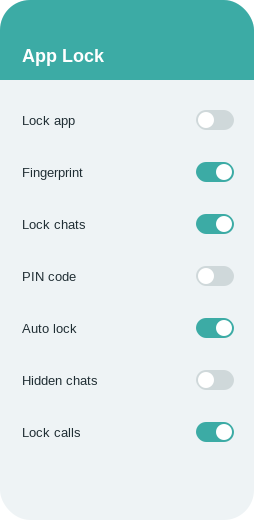
Lock the whole app or individual chats with a PIN, pattern or fingerprint without installing a separate locker.
Call Blocker
Decide who can reach you through WhatsApp voice and video calls and silently reject the rest.
Anti View Once
Photos and videos sent as view once can be opened again or saved, depending on the build.
Freeze Last Seen
Lock your last seen time at a chosen moment. It stays fixed no matter how much you use the app afterwards.
View Status Secretly
Watch statuses without your name appearing in the viewer list.
Hide Typing and Recording
Stop the typing and recording voice note indicators from appearing in the other person's chat.
Hide Online Status
Stay invisible while you chat. Contacts will not see the word online under your name even when the app is open.
Ghost Mode
One switch hides your online badge, typing and recording indicators, blue ticks and status views at the same time, so you can use the app without leaving a trail.
Hide Chats
Move conversations into a hidden area that only opens with a gesture and your lock code.
Larger File Sharing
Send long videos and large documents far beyond the stock limits. Recent builds advertise files up to around 1 GB.
Longer Video Status
Post longer video statuses and longer text captions than the official app allows.
Status Downloader
Save photos and videos from contacts' statuses straight to your gallery with one tap.
Original Quality Media
Disable compression so photos and videos arrive sharp and in their original resolution.
Send More Images at Once
Share a big batch of photos in a single go instead of splitting them into several messages.
Copy Status Text
Copy the caption or text of any status to your clipboard.
Translate Messages
Translate incoming messages inside the chat in supported builds.
Auto Reply
Answer messages automatically when you are busy, by keyword, contact or schedule. Normally this needs WhatsApp Business.
Broadcast to Groups
Send one broadcast message to several groups at once, handy for announcements.
DND Mode
Cut internet access for this app only, so other apps stay online while WhatsApp stays quiet.
Edit History
See the original text of messages that the sender later edited.
Message Without Saving
Start a chat with any number without adding it to your contacts first.
Pin More Chats
Pin many more conversations to the top of the list than the stock limit of three.
Message Scheduler
Write a message now and have it sent automatically at a chosen date and time.
Built in Updater
Get notified inside the app when a new build is released.
Multi Language
The interface is available in many languages and you can change it independently of the phone language.
Local Backup and Restore
Create backups in phone storage and restore them on reinstall or on a new phone.
Dual Accounts
Install it next to official WhatsApp and run a second number on the same phone.
Theme Store
Browse thousands of free themes made by the community and apply them instantly, or save your current look as a theme.
Custom Colors and Bubbles
Change header colors, chat bubbles, tick styles, wallpapers and icons individually.
Fonts and Emoji Styles
Switch to a different font for the whole app and choose between emoji packs.
Home Screen Layout
Rearrange tabs, hide the camera icon, change the launcher icon and adjust the conversation list style.
Custom Notifications
Set different notification tones, LED colors and pop up styles per contact or group.
What is new in v18.80
The October 2026 release focuses on stability and privacy.
- Theme engine update with new bubble and icon styles
- New emoji set and extra fonts
- Hide unwanted home screen icons
- Message edit history view
- Ghost mode now covers status views and voice note recording
- Improved stability with fewer crashes on Android 14 and 15
- Pin more chats and archive tweaks
- Refreshed anti ban mechanism (risk is reduced, not removed)
Is GB WhatsApp safe? Ban risk explained
Is GB WhatsApp safe? The honest answer is that it carries more risk than the official app. Messages still use WhatsApp's end to end encryption once they leave your phone, but the app itself is built and signed by people outside Meta, and nobody independent audits each release. You are trusting the mod team and the place you downloaded the file from.
Practical tips: download from one source you trust and stick with it, check that the app name and version match what you expected, keep Play Protect on, avoid sending passwords, banking details or ID documents through any mod, and keep regular local backups.
About account bans
Can WhatsApp ban you for using GB WhatsApp? Yes. WhatsApp's Terms of Service forbid unofficial clients, and Meta periodically detects them. Bans come in two forms: a temporary ban with a countdown timer, usually lasting from a few hours to a few days, and in rarer cases a permanent ban of the number.
You will often see anti ban in a mod's description. Treat it as reduced risk rather than a guarantee. Ways to protect yourself: use a secondary number, avoid mass messaging and spam like behavior, keep the app up to date and keep a recent local backup so you can move to official WhatsApp quickly if needed.
Common errors and fixes
App not installed
Usually caused by a conflicting older copy signed differently, or not enough storage. Uninstall the old copy after backing up, free some space and try again.
Parse error
The download may be incomplete or corrupted. Delete the file and download it again over a stable connection.
You need the official WhatsApp to log in
Your build is outdated or has been detected. Install the latest version, and if the message persists, back up locally and use the official app for a while.
Verification code not arriving
Wait for the timer and request a voice call instead, make sure the number format is right and that you are not on a temporary ban.
Backup not found when restoring
Check that the backup folder sits in the exact path and name the app expects, and that storage permission is granted.
Play Protect blocks the install
Tap More details and Install anyway if you trust the source, or temporarily pause Play Protect scanning during the install.
GB WhatsApp vs official WhatsApp
Here is where the two apps really differ.
| Feature | GB WhatsApp | Official WhatsApp |
|---|---|---|
| Hide online status | Yes, including full ghost mode | Not possible while the app is open |
| Blue ticks | Per chat or group, and you still see others | Global switch only, and you lose other people's ticks too |
| Freeze last seen | Yes | No |
| Hide typing indicator | Yes | No |
| View status secretly | Yes, independent switch | Only by turning off read receipts |
| Anti delete messages | Yes | No |
| Anti delete status | Yes | No |
| Themes | Thousands of themes plus full custom styling | Light, dark and a few chat colors |
| Fonts | Many fonts | System font only |
| App lock | PIN, pattern or fingerprint, per app or per chat | Basic fingerprint lock |
| File sharing limit | Larger media in original quality | Up to 2 GB documents, media compressed |
| Images per message | Many more | 30 |
| Auto reply | Yes | WhatsApp Business only |
| Message scheduler | Yes | No |
| Status download | Yes | No |
| DND for one app | Yes | No |
| Pinned chats | Many more | 3 |
| Google Drive backup | No, local backup only | Yes |
| Official support and security reviews | No, community maintained | Yes, by Meta |
| Play Store availability | No, APK only | Yes |
| Account ban risk | Possible | None |
Pros and cons
Pros
- Far more privacy controls than the stock app
- Thousands of themes, fonts and layout tweaks
- Bigger file limits and original quality media
- Auto reply and scheduler without a Business account
- Anti delete for messages and statuses
- Runs alongside official WhatsApp with a second number
- Free, no subscription and no root
Cons
- Not official: no support or security review from Meta
- Possible temporary or permanent account ban
- No Google Drive backup, only local backups
- Manual updates; old builds can expire
- Fake or tampered APKs circulate on dubious sites
- Some features may break after WhatsApp server changes
A look inside the app
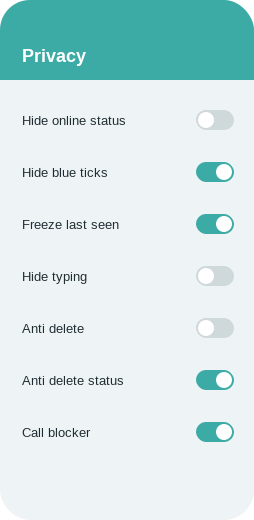
Simplified previews of the key panels (illustrations).
Other mods like GB WhatsApp
If GB WhatsApp is not quite right, these are the best known options.
FM WhatsApp
Developed by Fouad Mods, known for strong privacy options, lots of fonts and a clean settings layout.
WhatsApp Plus
One of the oldest mods, focused on visual customization with a characteristic blue theme.
YoWhatsApp (YoWA)
Originally by Yousef Al Basha, popular for themes, emoji variants and an iOS like look.
OGWhatsApp
Aimed mainly at running a second account, with a lighter feature set.
Fouad WhatsApp
Close sibling of FM WhatsApp with frequent updates and anti ban improvements.
GB WhatsApp Pro
A variant of GB with extra tweaks to themes and media options.
WhatsApp Business
Not a mod at all. Meta's own free app offers auto replies and labels, with full official support.
Release history
Here is a summary of recent releases. Earlier APKs are on the old versions page.
| Version | Released | Main changes |
|---|---|---|
| v18.80 | October 2026 | Stability fixes for Android 15, updated anti ban layer, new theme styles, ghost mode now includes status views. |
| v18.70 | September 2026 | Faster local backup, edit history view, notification fixes. |
| v18.60 | August 2026 | More pinned chats, new emoji set, bug fixes for media sending. |
| v18.50 | June 2026 | Message scheduler improvements, translation in chats, refreshed home screen options. |
| v18.30 | April 2026 | Anti view once refinements, call blocker update, minor UI changes. |
| v18.10 | February 2026 | Base updated to a newer WhatsApp build, new privacy menu layout. |
| v17.85 | December 2025 | Theme store refresh and performance work on low memory phones. |
| v17.70 | October 2025 | Status download improvements and larger video status support. |
| v17.60 | August 2025 | App lock per chat, new fonts, crash fixes. |
| v17.52 | June 2025 | Expired build replacement with login fixes. |
Requirements
- Android 5.0 Lollipop or newer (Android 8 or later recommended)
- At least 200 MB of free storage for the app, plus space for media and backups
- A phone number that can receive SMS or a call for verification
- An internet connection, Wi Fi recommended for the first download
- Permission to install apps from unknown sources
- Optional: a computer or cloud drive to keep copies of local backups
App permissions
- Contacts, to show your address book
- Storage or media access, for photos, files and backups
- Camera and microphone, for calls, photos and voice notes
- Location, only if you share it in a chat
- Notifications, to alert you about new messages
Download and setup guide
Follow these steps in order for a clean install.
- Make a backup firstIf you plan to move your current number, open the official WhatsApp, go to Settings, Chats, Chat backup and tap Back up. This writes a local copy to your phone storage as well as to Google Drive.
- Download the APKTap any download button on this page. The file is saved to your Downloads folder. Your browser may warn that this type of file can harm your device; that warning appears for every APK outside the Play Store.
- Allow unknown sourcesOn Android 8 and newer open Settings, Apps, Special app access, Install unknown apps, choose your browser or file manager and enable Allow from this source. On older phones the toggle is under Settings, Security, Unknown sources.
- Install the fileOpen your file manager or the browser's downloads list, tap the APK and press Install. If Play Protect asks for a scan, you can scan it or choose Install anyway if you trust the source.
- Open and verify your numberLaunch the app, agree to the terms, choose your country and enter your number. Type the six digit code you receive by SMS or call.
- Restore and personalizeIf a local backup is detected, tap Restore. Then set your profile name and photo, open the extra settings menu and switch on the features you want.
How to update GB WhatsApp
GB WhatsApp does not update through the Play Store, so you update it manually. When a new version appears, download the newest APK and install it directly over the existing app. Android keeps your data in place because the package name and signature match, so chats, media and settings survive the update.
Before each update, run a quick local backup from the app's chat settings. It only takes a minute and protects you if an install goes wrong.
Many builds include an updater inside the special settings menu that checks for new releases. If you see a message saying your version has expired, that is your cue to install the latest APK.
How to back up and restore GB WhatsApp
Google Drive backup is not available in GB WhatsApp, because Google only allows the official app to use WhatsApp's Drive slot. Instead the mod writes backups to phone storage, which makes it important to copy them somewhere safe yourself.
To back up, open the three dot menu, Settings, Chats, Chat backup and tap Back up. The backup is stored in a folder in your internal storage (often Android/media/ followed by the app's package name, or a folder in the root named after the mod). Copy that whole folder to a computer, a USB drive or a cloud service now and then.
To restore on the same or a new phone, copy the backup folder back to the same location before installing, install the APK, verify your number and tap Restore when the app finds the backup. If it does not find it, check that the folder name and location exactly match what the app expects.
Move your chats from WhatsApp to GB WhatsApp
Moving from official WhatsApp to GB WhatsApp with the same number is possible without losing chats, but the order of steps matters.
First back up in the official app (Settings, Chats, Chat backup). Next, open your file manager and locate the WhatsApp folder under Android/media/com.whatsapp/WhatsApp. Copy or rename it to the folder name the mod expects; many GB builds use a folder called GBWhatsApp, and some builds detect the official folder automatically. Then uninstall official WhatsApp or simply keep it for another number, install GB WhatsApp, verify your number and tap Restore.
Going back the other way works the same in reverse: back up locally in GB WhatsApp, rename the folder back to WhatsApp under the official media path, install official WhatsApp from Google Play, verify the number and choose Restore from local backup.
Prefer two accounts?
If you do not want to move your main number, you can keep both apps. Install GB WhatsApp next to the official app and register a different number in each. This is a popular way to separate work and personal chats on a single phone.
FAQ
Can GB WhatsApp read other people's chats or spy on them?
No. It only changes how your own app behaves. It cannot access anyone else's messages.
Can I hide my online status from only some contacts?
Yes. The privacy menu lets you apply many options to all contacts, selected contacts, groups or everyone except chosen people.
Why is it not on the Google Play Store?
Because it modifies WhatsApp's app and breaks its terms, Google does not allow it on the Play Store. It is distributed only as an APK.
How much storage does it need?
The APK is around 76 MB, and the installed app needs roughly 200 MB plus space for media and backups.
Is GB WhatsApp free?
Yes. It is free to download and use, with no subscription and no in app purchases.
Will I lose my chats when updating?
No, installing a newer version over the old one keeps your chats. Uninstalling first would delete them unless you have a backup.
Why does Android warn that the file may be harmful?
That warning appears for every APK installed outside the Play Store. It is not specific to this app, but only continue if you trust the file's source.
What does 'You need the official WhatsApp to log in' mean?
Your build was detected or is outdated. Update to the latest version; if it continues, switch to official WhatsApp for a while using a local backup.
How do I update GB WhatsApp?
Download the newest APK and install it over the current app. Your data stays in place. Make a local backup first just in case.
Can I back up to Google Drive?
No. Only local backups are supported. Copy the backup folder to a computer or cloud storage yourself.
Do I need to root my phone?
No. It installs like any regular APK on a standard, unrooted Android phone.
Can others tell that I use GB WhatsApp?
Not directly. Your contacts see normal WhatsApp messages. However, if you use features like ghost mode, they may notice you never appear online.
Does GB WhatsApp work on iPhone?
No. It is an Android app. Websites offering an iOS version should be treated with suspicion.
Can I use it on a PC?
Not natively. Some people run it inside an Android emulator such as BlueStacks. You can also use WhatsApp Web style linking in some builds.
How do I go back to official WhatsApp?
Back up locally in GB WhatsApp, rename the backup folder to the official WhatsApp path, install the official app and restore from local backup.
What is GB WhatsApp?
GB WhatsApp is an unofficial, modified version of WhatsApp for Android. It keeps the normal messaging experience and adds extra privacy, customization, media and automation options.
Guides and tutorials
Install GB WhatsApp Safely in Five Minutes
A beginner friendly walkthrough for installing the GB WhatsApp APK on Android, including permissions and common errors.
How to See Deleted Messages in GB WhatsApp
How the anti delete feature in GB WhatsApp works for messages and statuses, and how to turn it on.
Is GB WhatsApp Banned? What You Need to Know
An honest look at WhatsApp bans for mod users: why they happen, what types exist and how to reduce your risk.
GB WhatsApp Auto Reply Guide
Create automatic replies by keyword, contact or schedule in GB WhatsApp.
Using the GB WhatsApp Message Scheduler
Plan birthday wishes, reminders and announcements with the built in message scheduler in GB WhatsApp.
GB WhatsApp Login Error: Causes and Fixes
Why GB WhatsApp shows the 'You need the official WhatsApp to log in' message and the steps that usually solve it.
Conclusion
GB WhatsApp gives you control the stock app does not offer, at the cost of official support. If that trade works for you, download the latest APK, keep a backup handy and update regularly.